Tuesday, January 10, 2017

New Kids Program Features!

Some of the cruise lines have greatly revamped their kid's programs. Check out these new features on Costa, Princess, and MSC!


Many kids will recognize Peppa Pig. The meet and greet with her is exactly what people love about Disney! They will be thrilled that Costa has this because she is a very well known figure as well. 

There will be a Peppa pig day, “Captain in training,” and “Princess for a day.” 

Don’t worry- for the older kids there is an X-box, dance and music classes, pool parties, and sports tournaments. 

The new site describes how many ships have a special baby pool*, and how the Fascinosa and Favolosa have two deck water parks! (THREE DECKS on the Diadema) The water parks sound awesome with water games, a pirate ship, and a castle. 

Be sure to click on the link to read more! 

*Ships with baby pools: Deliziosa, Diadema, Fascinosa, Favolosa, Luminosa, Magica, Mediterranea, and NeoRiviera.
__________________________________________________________________________


The kid's clubs are being made over into “Camp Discovery” in order to align more to the their partnership with the Discovery Channel. New programs will roll out together fleetwide while new center designs launch individually through 2018. 

Now it will be the Treehouse (3-7), the Lodge (8-12), and the Beach House (13-17)

It will feature Mythbusters activities, Survive Alaska, a scavenger hunt with Shark Attack, and a squid anatomy lesson with Just Squiddin’ Around. There will also be Jr. Rangers and and a chance to be an engineer for a day with programs from the California Science Center. 
_________________________________________________________________________


NEW! MSC Babycare Service is a babysitting service for babies and toddlers on MSC. This service is FREE during the listed hours. Having free babysitting for kids this young is an unprecedented move by a cruise line! 

Babycare is subject to prior booking, limited availability, for children between 1 and 3 years old(not inclusive). 

Available at the following times*, exclusively when the ship is AT SEA: 
between 1:00 and 2:00 pm and between 6:00 and 7:00pm. Completion of a registration form is required. Ask the Mini Club staff once you’re on board. Diaper changing and feeding must be provided by parents. 

*Times may vary by ship or itinerary


Friday, January 6, 2017

Use these onboard apps for your cruise!


While aboard the Star Princess, I couldn’t help but marvel at how useful the Princess@Sea onboard app for my phone was!

The app allowed me to message other guests to make plans. I could look up what activities were happening right then, and plan activities for the next day. It listed my onboard spending so that I could track it and curb it before anything got out of hand. I even found it useful for finding the nearest bathroom to my current location!

I hope this app guide encourages you to download the free apps connected to your cruise line before you next sail. I think that you will appreciate having them handy!
__________________________________________________________________________

Screen Shot 2017-01-06 at 12.44.04 PM.png
Carnival Hub App (Carnival)
Use the Carnival app to  track your spending and check the up-to-date schedule feature.

  • The Carnival Hub App is available on select ships for iphones and Android phones.
  • Like the best apps, the Hub App has a customizable schedule.
  • The food and drink section of the app provides schedules for the various food options and bars.
  • The ship map has interactive deck plans, and account information for you to keep track of your purchases while onboard.
  • There is a chat feature but it is not free.


__________________________________________________________________________
These app relates to the Cunard website rather than functioning as an onboard app. Only the Celebrity’s Fortunes free casino gaming app are intended for primary use onboard.
__________________________________________________________________________

Screen Shot 2017-01-06 at 11.29.28 AM.png
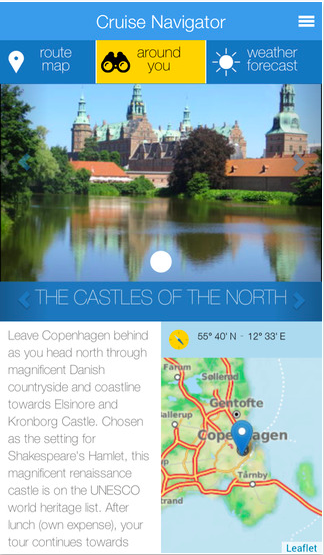
My Costa Mobile (Costa)
My Costa Mobile is the most straightforward app of them all. It allows you to chat, learn about your itinerary and check the weather.

  • MyCosta Mobile App is available for iPhone, Android, and iPad.
  • This app has FREE chat feature that lets you Call or Chat with other passengers onboard!
  • The cruise navigator is great for learning about the ports of call. It also provides weather updates which is a super helpful feature!


__________________________________________________________________________
Cunard App (Cunard)
This app relates to the Cunard website rather than functioning as an onboard app.
__________________________________________________________________________
Holland
This author has not found an onboard Holland app at this time. However, Holland does have a cool Glacier Bay podcast series for their Alaska voyages.
__________________________________________________________________________
Screen Shot 2017-01-06 at 11.06.49 AM.png

One neat feature of this app is the ability to chat for FREE one on one or in a group chat.

  • Disney Navigator App is available for iPhone, Android, and iPad.
  • The chat feature on this app is FREE and has a group chat feature.
  • It provides the ship deck plan which is very helpful for finding bathrooms!
  • The daily program is updated and customizable so you can save the events that you want to go to.
  • You also can get up-to-date details on character experiences, parties, dining, movies and live shows, the spa, youth clubs, pool times, and ports of call.


__________________________________________________________________________

MSC-Traveller-img.jpg
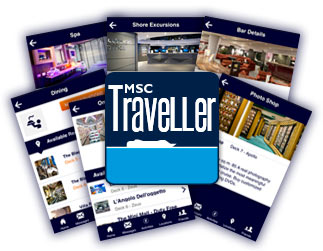
MSC Traveller is available for use on the MSC Divina, MSC Preziosa, and MSC Magnifica. This is one of the most unique apps with a location feature and 24/7 news updates.

  • This app is completely free and is available in 6 languages!
  • It provides up-to-date information about the ship, route, conditions at sea, and onboard promotions.
  • The Daily program is customizable to your favorite activities, and there is a location feature that lets others know where you are!
  • It provides FREE instant messaging and 24/7 world news updates!
  • You can reserve shore excursions and dinner reservations from the app.
__________________________________________________________________________

Screen Shot 2017-01-06 at 10.41.57 AM.png
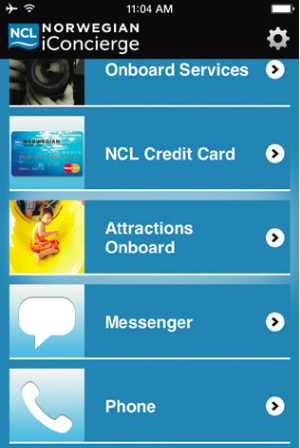
ICongierge is available for use on almost all of the ships except for the Norwegian Sky.

  • It is available for download on iPhones, Android, Windows phone, and iPad.
  • You can use it to preview and book shore excursions, create restaurant reservations, or reserve entertainment.
  • It provides updated information about your cruise rewards and has a folio review.
  • There is a schedule with daily activities, plus general information about onboard services, spa services, shopping, entertainment information, and restaurant information and menus.
  • This app does have a messaging and calling feature, but it is not free.

__________________________________________________________________________

Events_640x480.jpg
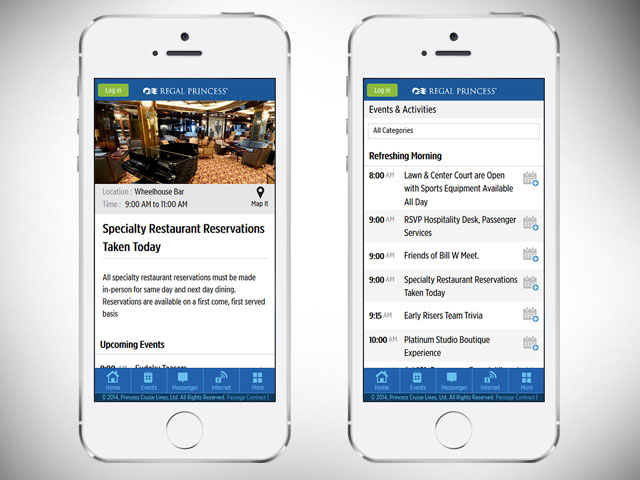
Princess@Sea (Princess)
This is the app that inspired this article!

  • This app has an events calendar that you can customize to show just the events that most interest you.
  • It has a FREE messaging app that is very handy when you’re spread all about a large ship.  
  • It has account details so that you can monitor your onboard spending.
  • It has destination guides that tell you about each of your ports on a clickable version of your itinerary.
  • It has ship venue details with hours, menus, and deck plans. I personally found the deck plans especially helpful for finding the nearest bathroom to your current location!
__________________________________________________________________________

ROYAL IQ (Royal Caribbean)
This app is not available on all of the ships, only the newest four: Quantum, Anthem, Ovation, and Harmony.

  • Available for Ipads, Iphones and Android phones
  • This app has an events calendar that you can customize to show just the events that most interest you.
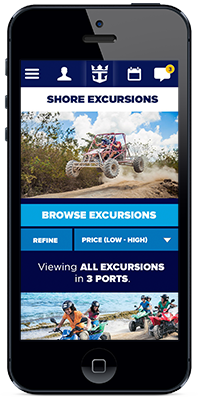
  • You can use it to book shore excursions, reserve dining or entertainment, and modify existing reservations


__________________________________________________________________________

Friday, December 9, 2016

Want to sail to Alaska for less? Go in September!

Want to Sail to Alaska for less? Go in September!
September is the very last month that you can cruise to Alaska. It is the tail end of the season, and all of the cruise lines stop sailing up there after that time. Sailings stop during the winter not due to the cold, but instead due to crushingly strong winds that sweep through the region during those cooler months.

I cruised to Alaska this past September, and I found that there are many upsides to sailing at the tail end of the season. I highly recommend making your booking for this time frame.

Benefit #1: Save Money

You will pay less! This is the time for greatly reduced rates. Since kids are starting school the ships do not fill up as easily. More supply and less demand allows the cruise lines to reduce their rates in order to lure you to Alaska. Let them lure you! Now is the time to sail for less!

Benefit #2: Less Crowded

The second benefit that I noticed is that there are fewer people on the ship. Many people will not go on vacations in September. This allows not only for lower prices, but a less crowded experience over all!

Benefit #3: Unique Opportunities

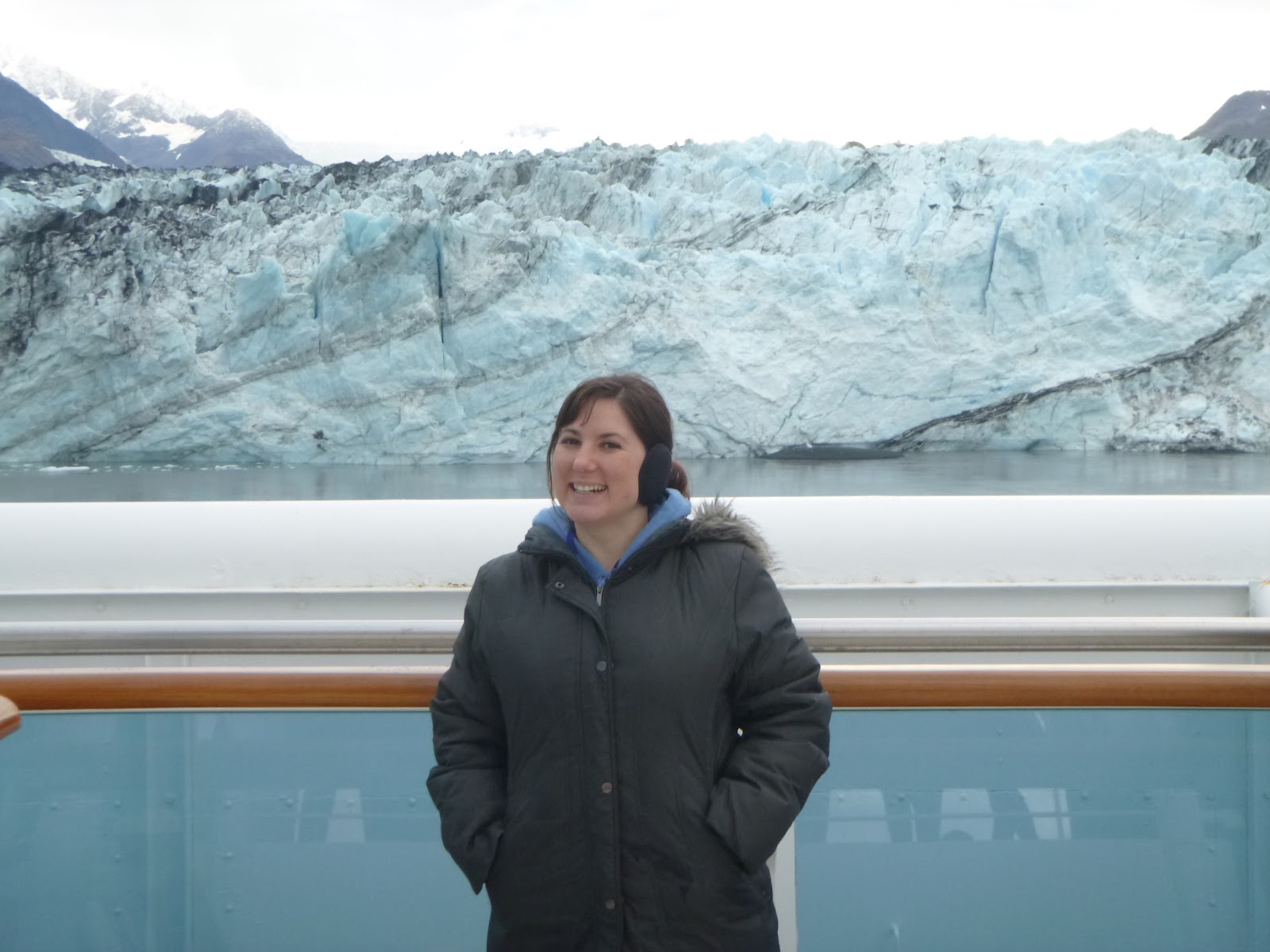
During the month of September there are opportunities for exciting deviations from the chartered course. On my sailing this meant that we sailed right up to Johns Hopkins glacier! This is a glacier that no cruise ships had been allowed to visit during the summer months due to seals being on the ice. However, during the slower season- we were allowed to go!

This is the beautiful Johns Hopkins glacier. The dots of ice in the water are covered with harbor seals that prevented us from getting closer. I won’t complain though, the harbor seals prevented other ships from visiting at all during the summer months!

Take the kids for some learning in the field. Introduce them to a field ranger, and glacial science. Examine the ecosystems that are fed by salmon migrations. September is frequently the least expensive time to cruise this fantastic itinerary. Bring the whole family, it’s worth it!

discover-shore-excursions-Princess.jpg
Kids panning for gold on one of Princess’s Alaska excursions.

Thursday, July 28, 2016

Cruise Hacks!

By Tasha Clites - Military Cruise Deals

Avoid Hefty ATM Fees on the Ship - I never bring quite enough cash -- mainly because I find it easier to spend and also lose! While there are ATM machines on the ship, they often charge fees ranging from $5 to $7 to withdraw cash! PLUS -- some banks or credit cards will charge you a fee of their own for not using one of their machines.

I found a clever way around this on my third cruise or so. Take your seapass card and head to the casino. Sit down at a slot machine and insert your card. Let’s say you want $200 cash. The machine will ask how much you want to “play” with. Enter in the amount you’d like to withdraw then hit “cash out” after it has given you those credits!
Go over to the cashier and collect your funds.

Everything you spend onboard the ship including casino play is charged to the credit or debit card you provided at the pier. Fees avoided ;)

Roll your clothes - Instead of folding, try rolling your clothes up. This not only prevents wrinkles but it also gives you much more space in your suitcase. You aren’t allowed to pack your own iron.  Additionally, some ships do not have an area where you can iron your clothing yourself. You may actually have to pay to get them steamed or ironed.  I totally stand by clothes-rolling and a good wrinkle release spray!

Surge Protector with USB Outlets - Cabins often have very few outlets so it can be difficult to charge all of your electronics at once.  Take your own multi-plug USB outlet so that you can charge your phone, camera, ipad, etc. all at once without have to swap them out periodically.

Ziploc Bags - These little guys are lifesavers! Taking a few empty baggies with you will prove to be so useful. You can use them when going on shore excursions to keep water and sand away from your electronics.  I also recommend taking larger grocery bags to store your wet clothes in in case there is not enough time to hang-dry them before your disembarkation.

Portable USB Charger - I tend to use my phone for photos these days as the camera quality is rather great. However, this means that my battery dies at a rapid rate. I don’t leave my cabin without my portable USB charger. I snagged one at Five Below, but you can get them almost anywhere these days. For a measly $5, it can’t hurt to have this as your safety net!

Travel Alarm Clock - Cruise ship cabins do not have alarm clocks. Some of us are okay using our cell phones - but insanely heavy sleepers like myself require a louder standard alarm clock.

In-room Bible - Bibles are typically left in the bedside tables.  Passengers have been known to leave leftover drink coupons in these. It can’t hurt to check. For two of my past cruises, I’ve scored a free drink this way!

Plastic Wrap your Toiletries - Though we keep our toiletries in their own bag inside of another bag, they somehow always spill out! Try placing plastic wrap under the caps of your shampoo/conditioner bottles to keep them from leaking out. Works like a charm.

Dryer Sheets in Luggage - We’ve noticed that on rather long flights, our clothes have a certain unwanted smell to them once our luggage arrives to our cabin.  We’ve purchased overpriced scent balls to put in our bags before to keep our clothing smelling fresh but we’ve found that tossing in a dryer sheet works even better and it is likely something you already have at home.

Free Wifi in Port - Wifi packages onboard the ship can be a little pricey and maybe you just want to check in on Facebook every now and then. When the ship pulls into port, check for free wifi. After you exit the ship, it is likely that you will see signs indicating “free Wifi” or you will see the masses of people hanging out there in one area. You can also ask the ship’s crew members. They know exactly where the free WiFi is!

Use the Ship’s WiFi while docked - If you did purchase an internet package for your cruise, using it in the port will give you an increased speed compared to when the ship is sailing the open waters where the connection is much slower.
 
Over-the-door Shoe Organizer - For families traveling together in one stateroom, the bathroom space is never quite adequate.  Take an over-the-door shoe organizer to store of all your toiletries, curling irons, etc. so it isn’t cluttering what limited counter space you have.

Drink for FREE - Beverage packages can be super expensive! If you’re one that just wants a drink or two per day at little to no cost, try this out! The daily itineraries always list something along the lines of “Captain’s Toast” where servers run around with trays full of complimentary mixed drinks, wine, or champagne. I’ve experienced this on Carnival, Norwegian, Royal Caribbean, and Princess recently. This fun little mixer is also a great way to meet other cruisers!

Additionally, for cruisers that have sailed with a particular line before, there is typically a coupon booklet left in your cabin that will have a drink coupon in it.  It pays to be loyal!

Lastly, the atrium shops have frequent “liquor tastings” where you can sample the brands they sell in their duty free shops.

You can often get your favorite brand for a better price than you can at home.  The only catch here is that they do not give you the goods until the last day of your cruise -- but it is typically a great deal!

Wednesday, April 27, 2016

Internet at Sea

Staying connected while at sea is now easier than ever as cruise ships are fully wired with internet cafes, Wifi, and cell phone reception.

However, not all cruise lines are equally wired and connection can vary from ship to ship within the same cruise line.

This article outlines the different packages and pricing that each cruise line and ship has to offer you during your cruise vacation.  

Pricing and availability are subject to change.

Azamara -

Internet and Wi-Fi: Both Azamara ships have onboard computer centers with 24-hour access. Wireless access on smartphones and laptops is available in designated areas on the ship.

Carnival -

Carnival offers three different types of plans that can be purchased for either a 24 hour period, or for the entirety of the cruise at a discounted rate. The pricing for each plan is as follows:

  • Social ($5 USD per day) – Access the most popular websites and applications. Includes: Facebook, Twitter, Instagram, Pinterest, Linkedin, Facebook Messenger and WhatsApp. Does not include access to other websites or apps.
  • Value ($16 USD per day) – Surf all your favorite sites, including e-mail, news, sports, weather, banking and finance. Note: Does not support Skype calling or music streaming (such as Spotify).
  • Premium ($25 USD per day) – From e-mail to Skype, our Premium plan promises the fastest possible connection, at speeds up to 3 times faster than our Value Plan. Supports Skype video calling, where coverage allows.

Users may easily upgrade from one plan to another. Users may use one device at a time on each plan, including either their personal devices or one of our on-board computers. All plans exclude video streaming (such as Netflix or Hulu). Cellular-network-dependent WiFi Calling and Facetime services are also not supported at this time. Printing is offered at no charge.

Celebrity -

Internet and Wi-Fi: Most ships in the fleet offer Wi-Fi connectivity throughout, with the exception of Celebrity Century and Celebrity Xpedition, which offer Wi-Fi in public areas. All ships have 24-hour Internet cafes. Eclipse, Millennium, Solstice, Silhouette, Summit, and Infinity also have iLounges with workstations and classes featuring the latest Apple products.

Fees: There is a flat Internet rate of 75 cents per minute or package rates of 38 minutes for $24.95; 90 minutes for $49.95; 208 minutes for $99.95 and 555 minutes for $199.95. The truly wired may want to book the "Involved" plan: 1,666 minutes for $399.95. The same rates apply to wireless hotspots on all ships, as well as to in-cabin Internet access.

Costa -

Internet and Wi-Fi: All ships have Internet cafes. Wi-Fi onboard works on all devices and is available throughout the ship.
To browse per minute, the price is 0,50€ while the 1 hour package is 20€, and 40€ for the 3 hour package.

Cunard -

For $45 satellite internet credit, you will receive 120 minutes of satellite internet time. (Depending on the packages available on board, there may also be a one-time activation fee of $3.75)

The internet stations are open 24 hours a day should you need to use one of their devices.

Disney -

Both Disney Magic and Disney Wonder have Internet Cafes (located in the Promenade Lounges), each with computer stations that provide email service and Web connectivity. On Disney Fantasy and Disney Dream, passengers can rent a laptop at the Cove Cafe for an additional charge.

On all ships, computers are available in the teen club, Vibe. Wireless high-speed Internet is available for passengers bringing their own wireless-ready laptops or other electronic devices, with many hotspots set up in a variety of public areas.


Holland -

The "Standard" plan offers 1,000 minutes for $250 (25 cents per minute), 500 minutes for $175 (35 cents per minute), 250 minutes for $100 (40 cents per minute), 100 minutes for $55 (55 cents per minute), a "pay as you go" option for 75 cents per minute and two "last day" plans: 30 minutes for $12 (40 cents per minute) and 15 minutes for $8.25 (55 cents per minute). The plan is available on Noordam, Oosterdam, Eurodam, Prinsendam and HAL's R-Class and S-Class ships.

On Nieuw Amsterdam and Zuiderdam, the "Hybrid" plan allows passengers to purchase either minutes or an unlimited Internet that spans the entire cruise. The plan offers 600 minutes for $199 (33 cents per minute), 400 minutes for $159 (40 cents per minute), 200 minutes for $99 (50 cents per minute), 30 minutes for $19 (63 cents per minute) and the "Unlimited Premium Voyage" package for $249.

Westerdam is the only ship to have the new social media package. Here's how those packages break down, priced for seven-day cruises.

  • "Social" ($5 for 24 hours or $25 for the week): Limits access to only eight social media sites, including Facebook and LinkedIn.
  • "Enhanced" ($16 for 24 hours or $60 for the week): Excludes videoconferencing and music streaming.
  • "Premiere" ($25 for 24 hours or $99 for the week): Excludes video streaming.

MSC -

Internet service is available at computers in Internet cafes on all MSC ships. Wi-Fi is available in all cabins and common areas.

You can save over 50% by pre-booking your internet package prior to your cruise.

They offer three different packages:

  • Social - Access for 1 device to social networks and chat apps —Facebook, Twitter, Instagram, LinkedIn, WhatsApp, Snapchat, WeChat, Pinterest, VK, Odnoklassniki, Sinaweibo, Qzone and Line. You can post photos, but audio and video are not available. $4.50 per day / $16.50 per cruise (for a 7 day cruise only)
  • Surfer - Access for up to 2 devices to social networks, chat apps, email and web browsing with standard bandwidth priority. Limit of 170 MB per day / 800 MB per cruise**. You can post photos, but audio and video are not available. $11.00 per day / $33.00 per cruise (for a 7 day cruise only)
  • Streamer - Full internet access for up to 4 devices, including audio and video streaming, with maximum bandwidth priority. Limit of 340 MB per day / 1.5 GB per 7 day cruise - $22.00 per day / $66.00 per 7 day cruise

Norwegian -

Norwegian’s internet packages vary from ship to ship.

See the table below to view the pricing and plans for the different vessels:


Princess -

Wifi is available on all Princess ships.  Pre-purchasing a package is the best value.
100 Minutes - $72.95 (Get an extra 20 minutes if you pre-purchase!)
200 Minutes - $102.95 (Get an extra 40 minutes if you pre-purchase!)
400 Minutes - $162.95 (Get an extra 60 minutes if you pre-purchase!)
600 Minutes - $202.95 (Get an extra 80 minutes if you pre-purchase!)
1000 Minutes - $252.95 (Get an extra 100 minutes if you pre-purchase!)

Royal Caribbean -

Royal Caribbean offers Wifi on all of its cruise ships.

Their new, faster internet program is known as “Voom” and is available on Oasis and Quantum Class ships.

The packages come in one of three options:
1 device at a time
  • Voom - $15 per day
  • Non-Voom - $20 per day

2 devices at a time
  • Voom - $22.50 per day
  • Non-Voom - $30 per day

4 devices at a time

  • Voom - $40 per day
  • Non-Voom - N/A